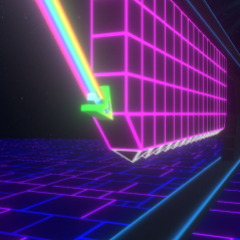
Geometry Arrow 3D is a rhythm-based arcade game where I fly a 3D arrow through dangerous neon mazes, dodge deadly traps, and race to the finish line.
My first impression of Geometry Arrow 3D
To me, jumping into this updated 3D version feels like experiencing the classic formula in a whole new dimension. Developed as an evolution of the original Geometry Arrow, it keeps your core mission the same: guide your arrow ship safely to the finish line without crashing.
- Dazzling 3D Vibe: Everything from your ship to the deadly hazards is rendered in fully immersive 3D with vibrant neon lighting.
- Faster, Tighter Action: The pacing ramps up quickly, meaning your reaction times have to be sharper than ever.
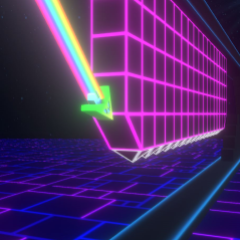
Every successful dodge feels amazing
What makes Geometry Arrow 3D stand out
What really keeps me glued to the screen is how seamlessly everything clicks together. If you enjoy fast-paced rhythm challenges, you might also want to check out similar titles like Geometry Dash Breeze, Geometry Dash Wave 3D, or Wave Dash.
- Engaging 3D Space: Forget boring straight paths. You'll race through twisting tunnels and curves that make it feel like you are truly hurtling through deep space.
- In Sync With The Beat: The pumping electronic soundtrack drives the gameplay forward, making every directional change feel completely in tune with the music.
- Pure Addiction: As stages progress, the speed pushes your reflexes to the limit, turning every successful dodge into a massive rush of adrenaline.
- Warming Up: Before tackling these intense futuristic tracks, I often like to brush up on my core timing using classics like Geometry Dash Lite.
Conquering the game maps
Geometry Arrow 3D keeps things varied by offering four distinct maps, scaling smoothly from beginner-friendly to controller-breaking difficulty.
- Map Difficulty: Map 1 acts as your smooth introduction, while Map 4 is an absolute nightmare for even seasoned players.
- Normal vs. Practice Mode: You can choose Normal Mode to test your raw skills or drop checkpoints in Practice Mode to figure out brutal sections piece by piece.
- Secret Collectibles: Keep your eyes peeled for hidden coins scattered across every map while keeping your main focus on dodging those sharp spikes!
| Feature |
Geometry Arrow |
Geometry Arrow 3D |
| Graphics |
Flat 2D vector style |
Fully immersive 3D with neon lights |
| Environment |
Simple linear backgrounds |
Dynamic tunnels, curves, and spatial depth |
| Visual Complexity |
Straightforward obstacles |
Multi-angled hazards requiring fast reactions |
Although the gameplay objective stays the same, the upgraded visuals and higher speed make Geometry Arrow 3D feel more exciting and intense.
FAQs
Can I play Geometry Arrow 3D directly in my web browser?
Yes, you can jump right into the action online without needing any hefty downloads or installations.
Is Geometry Arrow 3D harder than the original?
Yes. The faster speed and 3D perspective made it much more challenging for me, especially during the later maps.
Does Geometry Arrow 3D include a practice mode?
Yes. Every map includes both Normal Mode and Practice Mode, making it easier to learn difficult sections.
How many maps are available to play in Geometry Arrow 3D?
The game features 4 maps with escalating difficulty levels, ranging from beginner-friendly to extremely challenging.
What is the difference between Normal Mode and Practice Mode?
Normal Mode tests your ability to clear the map in one clean run, while Practice Mode lets you place checkpoints to easily learn difficult obstacle patterns.